


$0.00


0
Cameras : Mirrorless : SKU: 5331C079
Manufacturer: Canon
Part Number: 5331C079
UPC: 0660685245150
Thinking of making a large purchase?
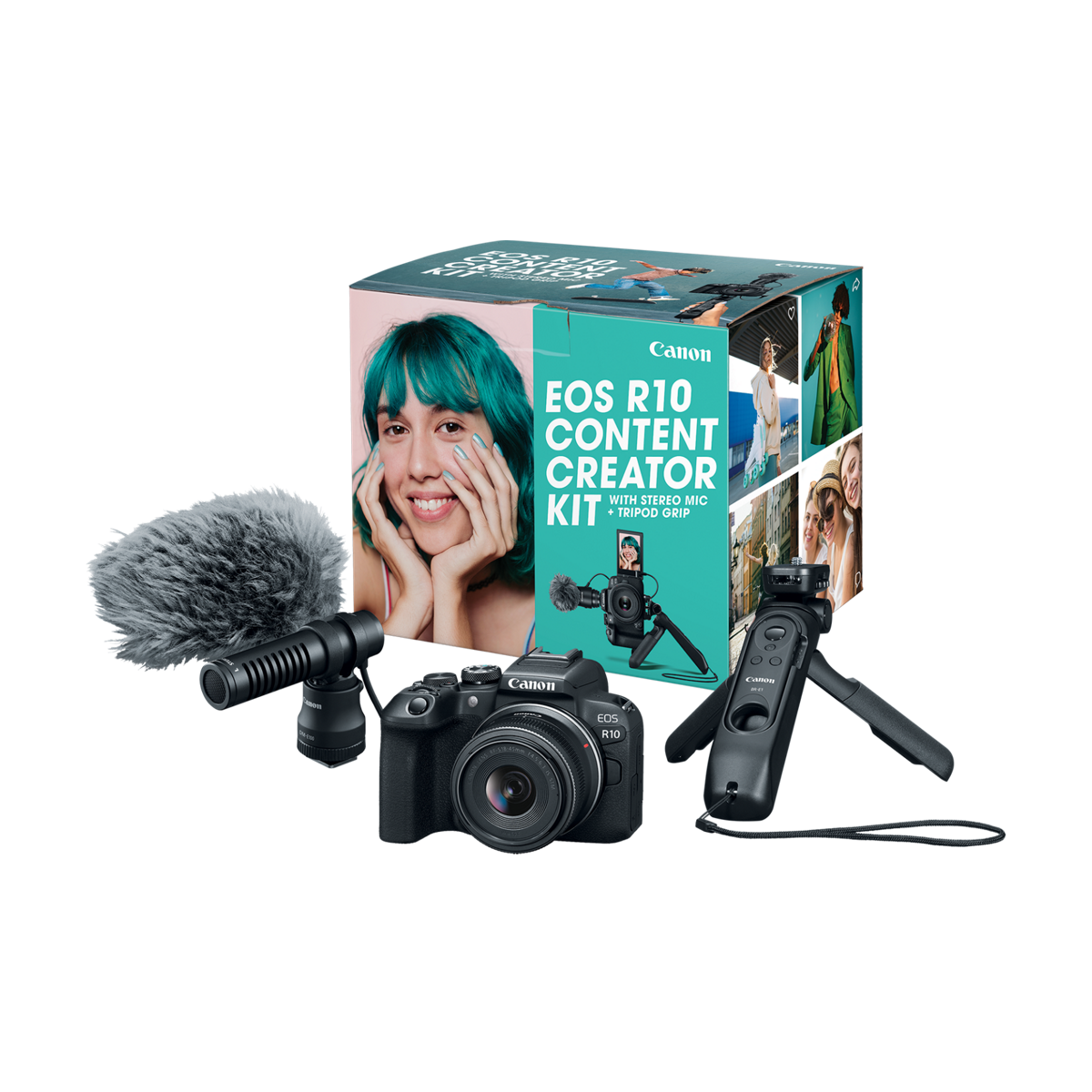
Canon EOS R10 Content Creator Kit
IN STOCK!
Estimated Delivery with free shipping by:
Saturday November 14th*
* If ordered today with free shipping.
Features
OverView
Canon EOS R10 Content Creator Kit. Effective pixels: Approx. 24.2 megapixels. Type: Digital single-lens non-reflex AF/AE camera. Image Processor: DIGIC X. Lens Mount: Canon RF mount. Type (2): CMOS sensor (compatible with Dual Pixel CMOS AF). Sensor Size: Approx. 22.3 x 14.9 mm. Pixel Size: Approx. 3.72 µm square. Total Pixels: Approx. 25.5 megapixels. Aspect Ratio: 3:2 (Horizontal: Vertical). Color Filter System: RGB primary color filters. Low Pass Filter: Installed in front of the image sensor, non-detachable. HDR Mode-Continuous Shooting: (1) 1 shot only (2) Every shot. Advanced shooting operations: (1) Focus Bracketing (2) Interval Timer (3) Bulb Timer (4) Multi-Shot NR. Color Space: Selectable between sRGB and Adobe RGB. Picture Style: Auto Standard Portrait Landscape Fine Detail Neutral Faithful Monochrome User Defined 1-3. Auto White Balance: Option between ambience priority and white priority settings.. Type (3): OLED color electronic viewfinder; approx. 2.36 million dots resolution.
Specification
| Advanced shooting operations | (1) Focus Bracketing (2) Interval Timer (3) Bulb Timer (4) Multi-Shot NR |
|---|---|
| AE Lock 1 | Auto AE lock The metering mode for AE lock after one-shot focus can be customized in the AE lock |
| AE Lock 2 | meter menu. User-applied AE lock In the Fv, P, Tv, Av and M modes, enabled with the AE lock button. |
| AE Lock 3 | (Press again to update.) Enabled in all metering modes. |
| AF Methods 1 | AF Method Whole area AF Spot AF 1-point AF Expand AF Area (Above, below, left and right/Around) |
| AF Methods 2 | Expand AF Area: Around Flexible Zone AF 1,2,3 |
| AF Working Range 1 | EV -4 to 20 (f/1.2 lens*, center AF point, One-Shot AF, at room temperature, ISO 100) * Except RF |
| AF Working Range 2 | lenses with a Defocus Smoothing (DS) coating. |
| Aspect Ratio | 3:2 (Horizontal: Vertical) |
| Auto White Balance | Option between ambience priority and white priority settings. |
| Battery | LP-E17 With the USB Power Adapter PD-E1, in-camera charging is possible when camera is off. |
| Battery Check | Automatic battery check when the power switch is turned ON. Displayed in 4 levels |
| Brightness Control | Manually adjustable to one of seven brightness levels |
| Canon Log | Not supported |
| Clean HDMI output | Provided |
| Cloud RAW Image Processing via image.canon 1 | Still RAW photos can be transferred to image.canon for RAW development using Deep Learning |
| Cloud RAW Image Processing via image.canon 2 | technology resulting in clearer images without losing detail through the reduction of noise, false |
| Cloud RAW Image Processing via image.canon 3 | color, moiré and jagged lines. *This feature requires a paid subscription (service begins July 25, |
| Cloud RAW Image Processing via image.canon 4 | 2022). |
| Color Filter System | RGB primary color filters |
| Color Space | Selectable between sRGB and Adobe RGB |
| Communication with a Smartphone 1 | Images can be viewed, controlled, and received using a smartphone. Remote control of the camera |
| Communication with a Smartphone 2 | using a smartphone is possible depending on the Camera Connect specifications. Images can be sent to |
| Communication with a Smartphone 3 | a smartphone. Firmware can be downloaded and saved to a card in the camera using Camera Connect. |
| Compatible E-TTL Speedlites | Canon EX- and EL-series Speedlites |
| Compatible Lenses 1 | Canon RF-S/RF lens group (excluding EF, EF-S and EF-M lenses) When using Mount Adapter EF-EOS R: |
| Compatible Lenses 2 | Canon EF or EF-S lenses (excluding EF-M lenses) |
| Continuous flash control | E-TTL each shot E-TTL 1st shot |
| Coverage (2) | Approx. 100% vertically/horizontally |
| Coverage 1 | Approx. 100% vertically and horizontally relative to the shooting image area (with image quality L, |
| Coverage 2 | at approx. 22mm eyepoint). |
| Custom Dials | Customizable Dials Main dial Quick control dial Control ring |
| Custom Functions 1 | Still photo Movie Shutter button (half-press) Yes - Movie shooting button Yes - Multi-function () |
| Custom Functions 2 | button Yes Yes ISO speed button Yes Yes AF-ON button Yes Yes AE lock (<*>) button Yes Yes AF point |
| Custom Functions 3 | button Yes Yes DOF preview button Yes Yes Lens function () button Yes Yes Cross keys: Up button Yes |
| Custom Functions 4 | Yes Cross keys: Left button Yes Yes Cross keys: Right button Yes Yes Cross keys: Down button Yes Yes |
| Custom Functions 5 | Set button Yes Yes Multi-controller Yes Yes |
| Dimensions (W x H x D) | Approx. 4.82 x 3.46 x 3.28 in. / 122.5 x 87.8 x 83.4mm Based on CIPA standards. |
| Dioptric Adjustment Range | Approx. -3.0 to + 1.0 m (dpt) |
| Display Format 1 | Item Still Photo Movie - Magnify zoom display 1.5x-10x (5 levels) - AF point display Yes - Grid |
| Display Format 2 | display Off / 3x3 / 6x4 / 3x3+diag - Rating OFF / 1 to 5 Stars Select images / Select range / All |
| Display Format 3 | images in folder / All images on card / All found images Image Search Search conditions Rating / |
| Display Format 4 | Date / Folder / Protect / Type of file (1) / Type of file (2) Protect Select images / Select range / |
| Display Format 5 | All images in folder / Unprotect all images in folder / All images on card / Unprotect all images on |
| Display Format 6 | card / All found images / Unprotect all found images Cloud RAW image processing Supported - RAW |
| Display Format 7 | image processing Supported RAW Burst processing Supported HEIF -> JPEG Conversion Supported - |
| Display Format 8 | Cropping Supported - |
| Dots | Approx. 1.04 million dots |
| DPOF | Compliant to DPOF Version 1.1 |
| Drive Modes and Continuous Shooting Speed | Click here to view full specifications PDF |
| Dust Deletion Feature 1 | Self Cleaning Sensor Unit Removes dust adhering to the low-pass filter. At power off only / Enable / |
| Dust Deletion Feature 10 | shooting. Manual cleaning (by hand) |
| Dust Deletion Feature 2 | Disable. Performed automatically (taking about approx. 2 sec. as indicated on the screen) or |
| Dust Deletion Feature 3 | manually (taking about approx. 7 sec. as indicated on the screen). After manually activated |
| Dust Deletion Feature 4 | cleaning, the camera will automatically restart (Power OFF to ON). When [Multi Shot Noise |
| Dust Deletion Feature 5 | Reduction], [Multiple exposures], or [HDR mode] is set, [Clean now] and [Clean manually] cannot be |
| Dust Deletion Feature 6 | selected. Dust Delete Data acquisition and appending The coordinates of the dust adhering to the |
| Dust Deletion Feature 7 | low-pass filter are detected by a test shot and appended to subsequent images. The dust coordinate |
| Dust Deletion Feature 8 | data appended to the image is used by the EOS Canon Digital Professional Software to automatically |
| Dust Deletion Feature 9 | erase the dust spots. Not available in focus bracketing, RAW burst mode, or multiple-exposure |
| Effective pixels | Approx. 24.2 megapixels |
| Erase 1 | Except protected images Select images to erase Select range All images in folder All images on card |
| Erase 2 | All found images |
| Estimated Camera Recovery Time 1 | Estimated recovery times are indicated below. These are affected by various factors such as ambient |
| Estimated Camera Recovery Time 2 | temperature, continued camera operation and the selected shooting resolution. The time until full |
| Estimated Camera Recovery Time 3 | record time is available, will vary with ambient temperature. Click here to view full specifications |
| Estimated Camera Recovery Time 4 | |
| Estimated Recording Time and Data | Click here to view full specifications PDF |
| E-TTL balance | Ambience priority, standard, flash priority |
| E-TTL II Flash Meterings | Evaluative (Face Priority) Evaluative Average |
| Exposure Compensation (2) | ±3 stops in 1/3- or 1/2-stop increments |
| Exposure Compensation 1 | Photo Movie Manual ±3 stops in 1/3- or 1/2-stop increments AEB ±3 stops in 1/3- or 1/2-stop |
| Exposure Compensation 2 | increments |
| Exposure Control Modes | Click here to view full specifications PDF |
| Eye Point | Approx. 22mm (at -1 m-1 from the eyepiece lens end) |
| File Numbering 1 | The following file numbers can be set: File numbering methods Continuous numbering The numbering of |
| File Numbering 2 | captured images continues even after you replace the card. Auto reset When you replace the card, the |
| File Numbering 3 | numbering will be reset to start from 0001. If the new SD card already contains images, the |
| File Numbering 4 | numbering will continue from the last recorded image in the card. |
| File Size 1 | 3:2 Aspect Ratio Large/HEIF/RAW: 6000 x 4000 Medium: 3984 x 2656 Small 1: 2976 x 1984 Small 2: 2400 |
| File Size 2 | x 1600 4:3 Aspect Ratio Large: 5328 x 4000* Medium: 3552 x 2664 Small 1: 2656 x 1992* Small 2: 2112 |
| File Size 3 | x 1600* RAW: 6000 x 4000 16:9 Aspect Ratio Large: 6000 x 3368* Medium: 3984 x 2240* Small 1: 2976 x |
| File Size 4 | 1680* Small 2: 2400 x 1344* RAW: 6000 x 4000 1:1 Aspect Ratio Large: 4000 x 4000 Medium: 2656 x 2656 |
| File Size 5 | Small 1: 1984 x 1984 Small 2: 1600 x 1600 RAW: 6000 x 4000 Values for Recording Pixels are rounded |
| File Size 6 | to the nearest 100,000th. RAW/C-RAW images are generated at 3:2, with information added about the |
| File Size 7 | specified aspect ratio, and JPEG images are generated at the specified aspect ratio. These aspect |
| File Size 8 | ratios (M / S1 / S2) and pixel counts also apply to resizing. * Indicate an inexact proportion. |
| Flash Exposure Compensation | ±3 stops in 1/3- or 1/2-stop increments |
| Flash Function Menu | Provided for EX- and EL-series Speedlites |
| Focus Method | Dual Pixel CMOS AF |
| Focus mode switch 1 | AF / MF Applies when an RF or RF-S lens without a focus mode switch is attached. When lenses with a |
| Focus mode switch 2 | focus mode switch are attached, the setting on the lens takes precedence. |
| Focusing | Dual Pixel CMOS AF II |
| Focusing brightness range@999br/> (in movie 1 | Full HD 29.97fps : EV -3.5 to 20 With an f/1.2 lens*, center AF point, One-Shot AF,at room |
| Focusing brightness range@999br/> (in movie 2 | temperature, ISO 100 * Except RF lenses with a Defocus Smoothing (DS) coating. |
| Function 1 | The Quick Control screen is accessed by pressing the Quick Control button during still photo |
| Function 2 | shooting. |
| HDR Mode-Continuous Shooting | (1) 1 shot only (2) Every shot |
| HDR PQ Shooting | Disable / Enable * Can be used in conjunction with Auto Lighting Optimizer. |
| HDR PQ Shooting - Movie 1 | Recording format Bit depth Color sampling method HDR specification MP4 10 bit YCbCr 4:2:2 Rec. ITU-R |
| HDR PQ Shooting - Movie 2 | BT.2100 (PQ) |
| HDR PQ Shooting - Still 1 | Recording format Bit depth Color sampling method HDR specification HEIF 10 bit YCbCr 4:2:2 Rec. |
| HDR PQ Shooting - Still 2 | ITU-R BT.2100 (PQ) |
| Headphone Terminal | Not Supported |
| Highlight Alert | The white areas with no image data will blink. |
| Histogram | Brightness and RGB |
| Image Format 1 | Still: JPEG, HEIF, RAW, Dual Pixel RAW, Raw Burst, C-RAW (CR3); Movies: ALL-I*, IPB, IPB Light * |
| Image Format 2 | Time-lapse movies only |
| Image Processor | DIGIC X |
| Interface Languages 1 | 29 (English, German, French, Dutch, Danish, Portuguese, Finnish, Italian, Ukraine, Norwegian, |
| Interface Languages 2 | Swedish, Spanish, Greek, Russian, Polish, Czech, Hungarian, Vietnamese, Hindi, Romanian, Turkish, |
| Interface Languages 3 | Arabic, Thai, Simplified/Traditional Chinese, Korean, Malay, Indonesian, Japanese) |
| IS Mode Overview 1 | Although the camera has no in-body IS, setting to Movie digital IS during movie recording will |
| IS Mode Overview 2 | enable digital image stabilization. Item Still photo shooting Movie recording Lens IS mode On / Off |
| IS Mode Overview 3 | On / Off Movie digital IS On / Off* Off / On / Enhanced Still photo IS - - Focal length setting - - |
| IS Mode Overview 4 | Simultaneous use of IS mode and Movie digital IS is supported in movie recording. *1: Functions when |
| IS Mode Overview 5 | recording movies in still photo shooting mode. |
| ISO Speed Range 1 | Available ISO speeds; user-set Normal ISO 100-32000 (in 1/3- or 1-stop increments) Expanded H |
| ISO Speed Range 10 | 100*-6400* ISO 100*-6400* TV AV M B ISO 400* ISO 400* ISO 400* Basic Zone A+ ISO 100-6400 ISO |
| ISO Speed Range 11 | 100-6400 ISO 100-3200 SCN Varies by shooting mode Creative Filters Varies by shooting mode * ISO 200 |
| ISO Speed Range 12 | when [Highlight tone priority] is set to [Enable] or [Enhanced]. * Varies depending on [Maximum] and |
| ISO Speed Range 13 | [Minimum] of [Auto range]. * If outside the setting range, changed to the value most close to ISO |
| ISO Speed Range 14 | 400. |
| ISO Speed Range 2 | (equivalent to ISO 51200) For [Highlight tone priority], the settable ISO speed range will be ISO |
| ISO Speed Range 3 | 200 to 32000. Expanded ISO cannot be set for HDR mode or during HDR PQ shooting. User-defined ISO |
| ISO Speed Range 4 | range - still photo shooting ISO Speed Range ISO Speed Minimum L 100 - 32000 (in 1-stop increments) |
| ISO Speed Range 5 | Maximum ISO 200 - H (51200) (in 1-stop increments) * Expanded ISO speeds are noted as being |
| ISO Speed Range 6 | "equivalent" to these speeds. User-defined Auto ISO range - still photo shooting Auto Range ISO |
| ISO Speed Range 7 | Speed Minimum ISO 100-25600 (in 1-stop increments) Maximum ISO 200-32000 (in 1-stop increments) ISO |
| ISO Speed Range 8 | Auto details in still photo shooting Shooting Mode No Flash Using Flash Variable control of maximum |
| ISO Speed Range 9 | ISO Auto limit for E-TTL Compatible lens Incompatible lens Creative Zone P ISO 100*1*2-32000* ISO |
| Lens Mount | Canon RF mount |
| Low Pass Filter | Installed in front of the image sensor, non-detachable |
| Magnification / Angle of View | Approx. 0.95x / Approx. 28 degrees (with 3:2 display, a 50mm lens at infinity, -1 m-) |
| Metering Modes 1 | Real-time metering with image sensor (384 [24x16 zone metering]) Evaluative metering Partial |
| Metering Modes 2 | metering (approx. 5.8% of the area at the center of the screen) Spot metering (approx. 2.9% of the |
| Metering Modes 3 | area at the center of the screen) Center-weighted average metering |
| Metering Range 1 | Still Photo Shooting : EV -2 to 20 (at room temperature, ISO 100) Movie Recording: EV 0 to 20 (at |
| Metering Range 2 | room temperature, ISO 100) |
| Microphone Input Terminal | 3.5mm diameter stereo mini jack |
| Monitor Size | 3.0-inch (screen aspect ratio of 3:2) |
| Movie Digital IS | Supported |
| Movie Recording Format | Click here to view full specifications PDF |
| Multi-function shoe | Supported |
| My Menu Registration 1 | Up to six top-tier menu items and Custom Functions can be registered. Up to five My Menu tabs can be |
| My Menu Registration 2 | added. My Menu tab overall operations Adding a tab Deleting tabs in a batch Deleting all tab items |
| My Menu Registration 3 | Setting the menu display My Menu tab detailed operations Selecting a registered item Sorting |
| My Menu Registration 4 | registered items Deleting selected registered items Deleting registered items in a batch Deleting |
| My Menu Registration 5 | tabs Changing a tab name (16 ASCII characters) |
| Number of AF zones available for Automatic 1 | AF area: Horizontal: Approx. 100% x Vertical: Approx. 100%* Stills: Max. 651 zones (31 x 21) Movies: |
| Number of AF zones available for Automatic 2 | Max. 527 zones (31 x 17) |
| Picture Style | Auto Standard Portrait Landscape Fine Detail Neutral Faithful Monochrome User Defined 1-3 |
| Pixel Size | Approx. 3.72 µm square |
| Print from Wi-Fi Printers | Supported. |
| Product Type | Digital Camera |
| Protection 1 | Single image (select image) Select range All images in a folder All images on card Unprotect all |
| Protection 2 | images on card All found images (only during image search) Unprotect all found images |
| RAW + JPEG / HEIF Simultaneous Recording 1 | Simultaneous recording of any combination of RAW/C-RAW and JPEG/HEIF image-recording quality is |
| RAW + JPEG / HEIF Simultaneous Recording 2 | supported. |
| Recording Format 1 | Compliant to Design rule for Camera File system 2.0 and Exif 2.31*. *Supports time difference |
| Recording Format 2 | information. |
| Recording Media 1 | SD card SD card speed class-compatible. Compatible with UHS-II Eye-Fi cards and Multimedia cards |
| Recording Media 2 | (MMC) are not supported. |
| Remote control terminal | Remote Switch RS-60E3 type terminal supported |
| Remote Operation Using EOS Utility | The camera can be controlled via Wi-Fii using EOS Utility. |
| Security 1 | Connection Method Authentication Encryption Encryption Key Format and Length Camera Access Point |
| Security 2 | WPA2/ WPA3-Personal AES ASCII 8 characters Open Disable Infrastructure Open WEP Hexadecimal 10 |
| Security 3 | digits Hexadecimal 26 digits ASCII 5 characters ASCII 13 characters Disable Shared key WEP Same as |
| Security 4 | WEP above WPA-PSKWPA2-PSKWPA3-Personal TKIP AES 1-127 characters |
| Self Timer | 10-sec. delay, 2-sec. delay |
| Send Images to a Web Service 1 | Still photos (RAW, C-RAW, HEIF, and JPEG) and movies (MP4) can be uploaded to image.canon server |
| Send Images to a Web Service 2 | album. With the image.canon server, images can be sent to social media or a photo album link can be |
| Send Images to a Web Service 3 | sent (by the image.canon specifications). |
| Sensor Size | Approx. 22.3 x 14.9 mm |
| Settings 1 | Auto (Ambience priority/White priority) Day Light Shade Cloudy Tungsten light White fluorescent |
| Settings 2 | light Flash Custom (Custom WB) Color temperature Effective also in twilight and sunset. Setting |
| Settings 3 | method options include [Custom White Balance] and [Shoot to set WB]. |
| Shutter Lag Time 1 | Mechanical Shutter Electronic 1st Curtain Electronic shutter Shutter-release time lag *Measured with |
| Shutter Lag Time 2 | shutter button pressed fully from half-pressed position Approx. 100ms Approx. 50 ms Approx. 50 ms |
| Shutter Lag Time 3 | Based on Canon testing standards. |
| Shutter Release | Soft-touch electromagnetic release |
| Shutter Speeds 1 | When [Mechanical] or [Elec. 1st- curtain] is set: 1/4000-30 sec, bulb When [Electronic] is set: |
| Shutter Speeds 2 | 1/4000-30 sec. |
| Slow Sync@999br/> (P/Av modes) 1 | Mechanical Shutter Electronic 1st curtain 1/200-30 sec. auto 1/250-30 sec. auto 1/200-1/60 sec. auto |
| Slow Sync@999br/> (P/Av modes) 2 | 1/250-1/60 sec. auto 1/200 sec. (fixed) 1/250 sec. (fixed) |
| Standards Compliance | IEEE 802.11b/g/n |
| Standards Compliance (2) | Bluetooth Specification Version 4.2 compliant (Bluetooth low energy technology) |
| Start-up Time | Approx. 0.4 sec. Based on CIPA testing standards. |
| Still photo file size / Number of possible shots / | Click here to view full specifications PDF |
| Subject to Detect | People, Animals, Vehicles, No Priority * Available with [AF Area] set to Whole area AF |
| Temperature Warning 1 | The camera warns of rising internal temperatures by means of icons and indicators. Click here to |
| Temperature Warning 2 | view full specifications PDF |
| Total Pixels | Approx. 25.5 megapixels |
| Transition Frequency (Central Frequency) | 2.4 GHz band Frequency: 2412 to 2462 MHz Channels: 1 to 11 channels |
| Transmission Method | DS-SS modulation (IEEE 802.11b) OFDM modulation (IEEE 802.11g/n) |
| Transmission Method (2) | GFSK modulation |
| Type | Digital single-lens non-reflex AF/AE camera |
| Type (2) | CMOS sensor (compatible with Dual Pixel CMOS AF) |
| Type (3) | OLED color electronic viewfinder; approx. 2.36 million dots resolution |
| Type (4) 1 | Mechanical Electronic 1st-Curtain Electronic Shutter (1st and 2nd curtain - silent*) * A shutter |
| Type (4) 2 | release sound is not generated. However, note that the sounds other than the shutter release sound |
| Type (4) 3 | (aperture, focusing lens drive sound/electronic sound, etc.) may be generated. * In electronic |
| Type (4) 4 | shutter shooting under conditions such as flash firing by other cameras or with fluorescent lighting |
| Type (4) 5 | or other flickering light sources, a strip of light or banding due to the brightness difference may |
| Type (4) 6 | be recorded in the image. |
| Type (5) | TFT color, liquid-crystal monitor |
| USB Cables@999br/> Compatible with iPhones 1 | Operation with the following USB cables has been verified when connected to an iPhone.* Regardless |
| USB Cables@999br/> Compatible with iPhones 2 | of which cable is used, set the camera power to before connecting the cable. When connecting a USB |
| USB Cables@999br/> Compatible with iPhones 3 | Type-C to Lightning cable Use an Anker 514 Lightning to USB-C Accessory Cable (0.9 m, for Camera). |
| USB Cables@999br/> Compatible with iPhones 4 | When connecting a USB Type-C to USB Type-C cable Genuine Canon accessories are recommended |
| USB Cables@999br/> Compatible with iPhones 5 | (Interface Cable IFC-100U or IFC-400U). *As of May 2022 |
| USB Terminal 1 | Hi-Speed USB (USB 2.0) equivalent Terminal type: USB Type-C For computer communication / smartphone |
| USB Terminal 2 | communication USB battery charging / camera power supply |
| Video Out Terminal 1 | HDMI micro OUT terminal Type D (Resolution switches automatically) / CEC not compatible Images can |
| Video Out Terminal 2 | be displayed through the HDMI output and on screen at the same time. Images will not be displayed |
| Video Out Terminal 3 | unless [NTSC] or [PAL] is properly set according to the video system of the TV set. |
| Weight | Approx. 0.84 lbs (13.48 oz) Body Only Approx. 0.94 lbs (15.14 oz) With battery,and memory card |
| White Balance Shift 1 | Blue/amber bias: ±9 levels Magenta/green bias: ±9 levels Corrected in reference to the current WB |
| White Balance Shift 2 | mode's color temperature. Blue/amber and magenta/green shift can be set at the same time. |
| Wireless Communications | Images can be sent via Wi-Fi to a PictBridge-compatible (Wireless LAN) printer and printed. |
| Wireless remote control | Compatible with the Wireless Remote Control BR-E1 |
| Working Humidity | 85% or less |
| Working Temperature Range | 32-104° F / 0-+40°C |
| X-sync Speed | Mechanical Shutter: 1/200 sec. Elec. 1st-curtain: 1/250 sec. |


