


$0.00


0
Cameras : Mirrorless : SKU: 5803C012
Manufacturer: Canon
Part Number: 5803C012
UPC: 013803351361
Thinking of making a large purchase?
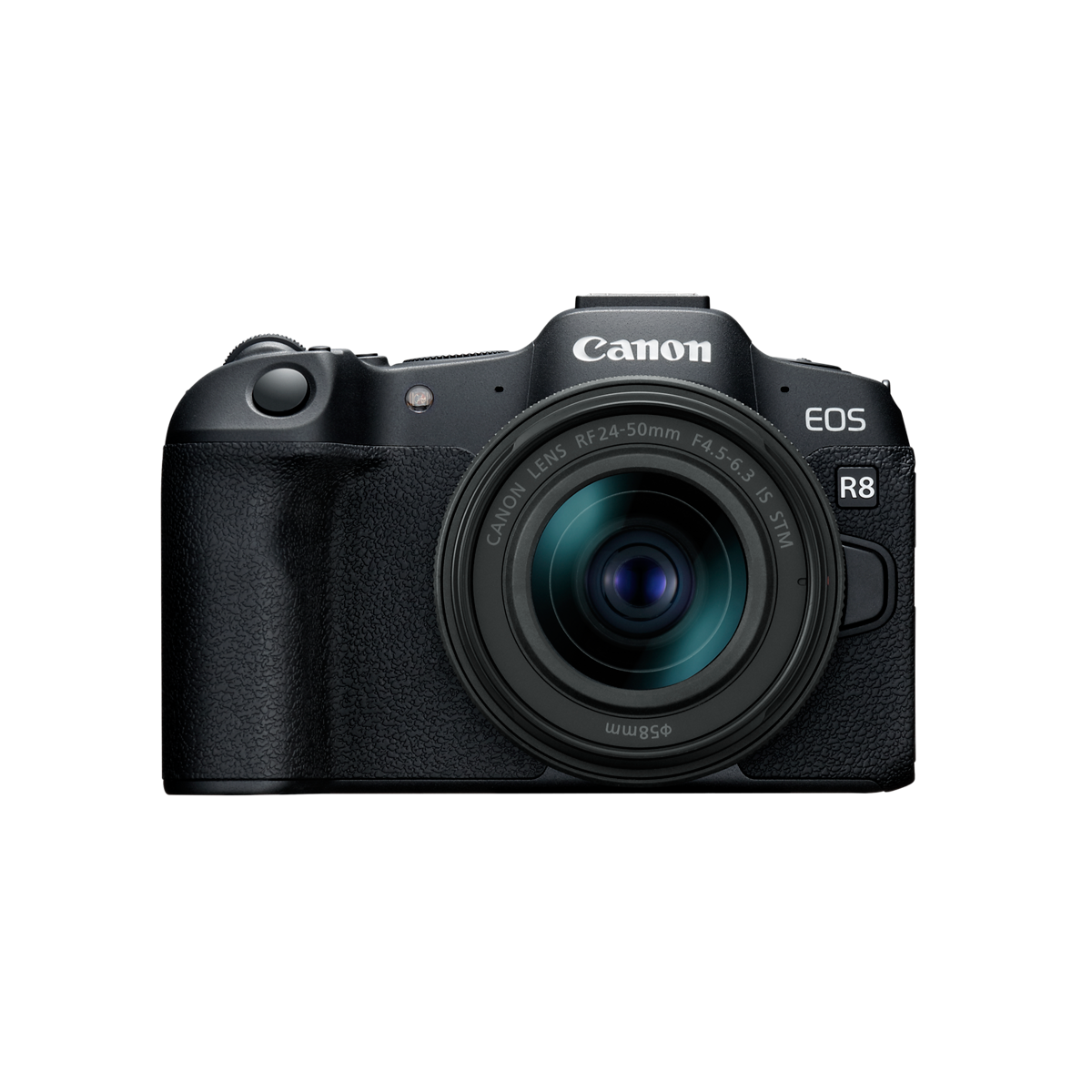
Canon EOS R8 RF24-50mm F4.5-6.3 IS STM Lens Kit
IN STOCK!
Estimated Delivery with free shipping by:
Saturday November 14th*
* If ordered today with free shipping.
Features
OverView
Canon EOS R8 RF24-50mm F4.5-6.3 IS STM Lens Kit. Effective pixels: Approx. 24.2 megapixels. Compatible Printers: Direct printing from camera not supported. Type: Digital interchangeable lens, mirrorless camera. Image Processor: DIGIC X. Recording Media: (One) SD card slot Compatible with UHS-II Eye-Fi cards and Multimedia cards (MMC) are not supported.. Lens Mount: Canon RF mount. Type (2): Full-frame CMOS sensor (compatible with Dual Pixel CMOS AF). Screen Size: Approx. 36.0 x 24.0 mm. Pixel Unit: Approx. 6.00 µm square. Total Pixels: Approx. 25.6 megapixels. Aspect Ratio: 3:2 (Horizontal:Vertical). Color Filter System: RGB primary color filters. Low Pass Filter: Installed in front of the image sensor, non-detachable. Color Space: Selectable between sRGB and Adobe RGB. Auto White Balance: Option between ambience priority and white priority settings, using SET button. Type (3): OLED color electronic viewfinder; 0.39-inch, approx. 2.36 million dots.
Specification
| Accessory Shoe 1 | Canon Multi-function accessory shoe Optional Canon AD-E1 adapter required for conventional |
|---|---|
| Accessory Shoe 2 | shoe-mount flashes and accessories |
| AE Lock 1 | Auto AE lock AE is locked as soon as subjects are in focus using One-Shot AF when set to selected |
| AE Lock 2 | metering mode in [C.Fn2: AE lock meter. mode after focus]. User-set AE lock. Use the AE lock button |
| AE Lock 3 | (update by pressing the button again) in Fv, P, Tv, Av, and M mode. Enabled in all metering modes.9 |
| Aspect Ratio | 3:2 (Horizontal:Vertical) |
| Auto White Balance | Option between ambience priority and white priority settings, using SET button |
| Available AF Areas 1 | Spot AF 1-point AF Expand AF area: Above/below/left/right Expand AF area: Around Flexible Zone AF 1 |
| Available AF Areas 2 | Flexible Zone AF 2 Flexible Zone AF 3 Whole area AF |
| Available Functions | Dial direction during Tv/Av; Control ring rotation direction; Customize buttons; Customize dials |
| Available Subject Detection 1 | Auto People Animals (dogs / cats / birds / horses) Vehicles (motorsports cars or motorcycles / |
| Available Subject Detection 2 | aircraft / trains) * Certain types of animals or vehicles may not be detected, depending on shape |
| Available Subject Detection 3 | and appearance |
| Battery 1 | Canon LP-E17 battery pack With the AC Adapter AC-E6N + DC Coupler DR-E18, AC power is possible (AC |
| Battery 2 | Adapter Kit ACK-E18 can also be used). USB Power Adapter PD-E1 supports in-camera charging of |
| Battery 3 | Battery Pack LP-E17 when the camera is turned off and can supply power when the camera is turned on. |
| Battery Check 1 | Automatic battery check with 4-level display when the power switch is turned ON. * Can be checked on |
| Battery Check 2 | the screen and in the viewfinder. |
| Bluetooth Pairing | Smartphone — up to 10 devices; BR-E1 remote controller — 1 unit |
| Brightness Control | Manually adjustable to one of seven brightness levels |
| Card Performance Requirements | Click here to view the full specifications PDF. |
| Clean HDMI Output | Provided |
| Coating | Anti-smudge coating not provided. Anti-reflection coating not provided. |
| Color Filter System | RGB primary color filters |
| Color Space | Selectable between sRGB and Adobe RGB |
| Communication with a Smartphone 1 | Images can be viewed, controlled, and received using a smartphone. Remote control of the camera |
| Communication with a Smartphone 2 | using a smartphone is possible depending on the Camera Connect specifications. Images can be sent to |
| Communication with a Smartphone 3 | a smartphone. NFC connection: Not supported Supported images: JPEG, HEIF, RAW/C-RAW, MP4 video files |
| Communication with a Smartphone 4 | Transcoding while sending: Size to send (original / reduced size); Quality to send (original / |
| Communication with a Smartphone 5 | compressed) |
| Compatible Lenses 1 | Canon RF lens group (including RF-S lenses) When using Mount Adapter EF-EOS R: Canon EF or EF-S |
| Compatible Lenses 2 | lenses (excluding EF-M lenses) |
| Compatible Printers | Direct printing from camera not supported |
| Connection Method | (1) Camera access point mode (2) Infrastructure mode |
| Continuous flash control | E-TTL each shot / E-TTL 1st shot |
| Continuous HDR Shooting (still images) | 1 shot only / Every shot * Not available when set to [Moving sub.]. |
| Coverage | Approx. 100% (at JPEG Large image quality, 3:2 aspect ratio, approx. 22 mm eyepoint) |
| Coverage (2) | Approx. 100% vertically/horizontally |
| Customizable Dials 1 | Functions can be assigned to the following camera controls. Main dial Quick control dial Control |
| Customizable Dials 2 | ring |
| Customize Buttons 1 | Functions can be assigned to the following camera controls. Shutter button (half-press) Movie |
| Customize Buttons 2 | shooting button Multi-function button AF-ON button AE Lock button AF point button Up key Left key |
| Customize Buttons 3 | Right key Down key SET button Lens function button Speedlite menu direct button |
| Dimensions (W x H x D) | Approx. 5.22 x 3.39 x 2.76 in. / 132.5 x 86.1 x 70.0mm Based on CIPA standards. |
| Dioptric Adjustment Range | Approx. -4.0 to + 1.0 m (dpt) |
| Display Format | Click here to view the full specifications PDF. |
| Dots | Approx. 1.62 million dots |
| DPOF | Compliant to DPOF Version 1.1 |
| Drive Modes and Continuous Shooting Speed 1 | Click here to view the full specifications PDF. *1: Not available when set to [Dual Pixel RAW: |
| Drive Modes and Continuous Shooting Speed 10 | that even with zoom lenses not listed, sudden zooming may cause flickering or changes in exposure). |
| Drive Modes and Continuous Shooting Speed 2 | Enable] (low-speed continuous shooting is used). *2: With electronic first-curtain, continuous |
| Drive Modes and Continuous Shooting Speed 3 | shooting speed is the same for Highspeed continuous + and High-speed continuous shooting. *3: Slower |
| Drive Modes and Continuous Shooting Speed 4 | maximum continuous shooting speed when set to Servo AF with lenses other than those in the lens list |
| Drive Modes and Continuous Shooting Speed 5 | attached. For details on lenses that support the indicated continuous shooting speed, refer to the |
| Drive Modes and Continuous Shooting Speed 6 | separate lens list. * With electronic first-curtain, maximum continuous shooting speed is (or may |
| Drive Modes and Continuous Shooting Speed 7 | be) reduced in flash photography, anti-flicker shooting, or Dual Pixel RAW shooting. * With certain |
| Drive Modes and Continuous Shooting Speed 8 | lenses, zooming during continuous shooting with electronic shutter may cause changes in exposure |
| Drive Modes and Continuous Shooting Speed 9 | even at the same f/number. For detail on relevant lenses, refer to the separate lens list (and note |
| Dust Deletion Feature 1 | Self Cleaning Sensor Unit Removes dust adhering to the low-pass filter. Auto cleaning: At power off |
| Dust Deletion Feature 2 | / Enable / Disable * Automatically performs the sensor cleaning during Power OFF/ON. Clean now * |
| Dust Deletion Feature 3 | Performs cleaning immediately. After the cleaning ends, the camera automatically restarts (Power OFF |
| Dust Deletion Feature 4 | to ON). Dust Delete Data acquisition and appending The coordinates of the dust adhering to the |
| Dust Deletion Feature 5 | low-pass filter are detected by a test shot and appended to subsequent images. The dust coordinate |
| Dust Deletion Feature 6 | data appended to the image is used by the EOS software to automatically erase the dust spots. Not |
| Dust Deletion Feature 7 | available with RF-S/EF-S lenses, in cropped shooting, during focus bracket shooting, in RAW burst |
| Dust Deletion Feature 8 | mode, multiple-exposure shooting, or HDR mode, or when Multi Shot Noise Reduction or the interval |
| Dust Deletion Feature 9 | timor or digital tele-converter is set. Manual cleaning (by hand) not supported |
| Effective pixels | Approx. 24.2 megapixels |
| Erase 1 | Except protected images Select images to erase Select range All images in folder All images on card |
| Erase 2 | All found images (only during image search) |
| Estimated Recording Time, Continued. 1 | H.265/HEVC (Canon Log: On or HDR PQ: On) Click here to view the full specifications PDF. * Bit rate |
| Estimated Recording Time, Continued. 2 | only applies to video output, not audio or metadata. * Audio is recorded when [C.Fn4 audio |
| Estimated Recording Time, Continued. 3 | compression:Enable] (Audio: AAC) is set. * Movie recording stops when the maximum recording time per |
| Estimated Recording Time, Continued. 4 | movie is reached. * No audio is recorded for approx. the last two frames with the compression method |
| Estimated Recording Time, Continued. 5 | for movie recording quality set to IPB (Standard) or IPB (Light) and the camera set to [C.Fn4 Audio |
| Estimated Recording Time, Continued. 6 | compression: Enable]. Moreover, the video and sound may be slightly out of sync when movies are |
| Estimated Recording Time, Continued. 7 | played back in Windows. * Mbps — megabits per second (8 megabits = 1 megabyte) |
| Estimated Recording time, Movie Bit Rate and 1 | H.264/AVC (Canon Log: Off, HDR PQ: Off) Click here to view the full specifications PDF. * Bit rate |
| Estimated Recording time, Movie Bit Rate and 2 | only applies to video output, not audio or metadata. * Audio is recorded when [C.Fn4 audio |
| Estimated Recording time, Movie Bit Rate and 3 | compression:Enable] (Audio: AAC) is set. * Movie recording stops when the maximum recording time per |
| Estimated Recording time, Movie Bit Rate and 4 | movie is reached. * No audio is recorded for approx. the last two frames with the compression method |
| Estimated Recording time, Movie Bit Rate and 5 | for movie recording quality set to IPB (Standard) or IPB (Light) and the camera set to [C.Fn4 Audio |
| Estimated Recording time, Movie Bit Rate and 6 | compression: Enable]. Moreover, the video and sound may be slightly out of sync when movies are |
| Estimated Recording time, Movie Bit Rate and 7 | played back in Windows. * Mbps — megabits per second (8 megabits = 1 megabyte) |
| E-TTL balance | Ambience priority, standard, flash priority |
| Exposure Compensation | Click here to view the full specifications PDF. |
| Exposure Compensation (2) | ±3 stops in 1/3- or 1/2-stop increments |
| Exposure Modes 1 | Scene Intelligent Auto Hybrid Auto Special Scenes Creative Filters Flexible-priority AE Program AE |
| Exposure Modes 2 | Shutter-priority AE Aperture-priority AE Manual Exposure Bulb Exposure Custom Shooting Modes C1, C2, |
| Exposure Modes 3 | C3 |
| Eye Detection 1 | Auto: Selects the eye closer to the camera (as detected from the angle of the face). At the same |
| Eye Detection 2 | distance from the camera, selects the eye closer to the center of the image. Right Eye: Prioritizes |
| Eye Detection 3 | the subject’s right eye. Left Eye: Prioritizes the subject’s left eye. Disable |
| Eye Point | Approx. 22mm (at -1 m from the eyepiece lens end) |
| File Format 1 | Normal Movies Click here to view the full specifications PDF. * Recording in AAC when [Audio |
| File Format 2 | compression] (C.Fn4) is set to [Enable] or Linear PCM when set to [Disable]. |
| File Numbering 1 | The following file numbers can be set: File numbering methods Continuous numbering The numbering of |
| File Numbering 2 | captured images continues even after you replace the card. Auto reset When you replace the card, the |
| File Numbering 3 | numbering will be reset to start from 0001. If the new SD card already contains images, the |
| File Numbering 4 | numbering will continue from the last recorded image in the card. Manual reset Resets the file |
| File Numbering 5 | number to 0001, and creates a new folder automatically. |
| File Size 1 | Click here to view the full specifications PDF. *1: Number of shots using a 32 GB card that conforms |
| File Size 2 | to Canon testing standards. *2: When set to [HDR shooting (HDR PQ): Disable]. *3: When set to [HDR |
| File Size 3 | shooting (HDR PQ): Enable]. * File sizes are determined based on Canon testing standards. |
| Flash Exposure Compensation | ±3 stops in 1/3- or 1/2-stop increments |
| Focus Method | Dual Pixel CMOS AF |
| Focusing brightness range (in movie recording) 1 | 4K: EV –4.0 to 21 Full HD: EV –4.5 to 21 (with an f/1.2 lens,* center AF point, One-Shot AF at room |
| Focusing brightness range (in movie recording) 2 | temperature, ISO 100, and 29.97 / 25.00 fps.) * Except RF lenses with a Defocus Smoothing (DS) |
| Focusing brightness range (in movie recording) 3 | coating. |
| Focusing brightness range (still photo shooting) 1 | EV –6.5 to 21 (with an f/1.2 lens,* center AF point, One-Shot AF at room temperature, and ISO 100) * |
| Focusing brightness range (still photo shooting) 2 | Except RF lenses with a Defocus Smoothing (DS) coating. |
| Function 1 | The Quick Control screen can be accessed by pressing the Quick Control button during shooting, |
| Function 2 | recording, or playback. |
| HDMI Out Terminal 1 | HDMI micro OUT terminal (Type D) * Supports 4K 60p output, and (to HDR TVs) HDR PQ video output. * |
| HDMI Out Terminal 2 | HDMI CEC not supported * Images may not be displayed unless [For NTSC] or [For PAL] is set correctly |
| HDMI Out Terminal 3 | for the TV video system. |
| HDR Mode 1 | Off / Moving sub. / Dynamic range * [Dynamic range]: For each shot, three images are captured |
| HDR Mode 2 | consecutively at different exposures (standard exposure, underexposure, and overexposure). * [Moving |
| HDR Mode 3 | sub.]: Output of a wide gradation without causing motion blur due to image composition by one |
| HDR Mode 4 | exposure is possible. * [Moving sub.]: Minimum ISO speed is ISO 800. * When [HDR mode] is set, |
| HDR Mode 5 | [Picture Style] options are limited to [Standard] and [Monochrome], and maximum shutter speed is |
| HDR Mode 6 | 1/8000 sec. * [Moving sub.]: [Electronic] shutter mode may increase subject distortion (due to |
| HDR Mode 7 | rolling shutter). * Shooting JPEG or HEIF images is supported. * Can be set in conjunction with HDR |
| HDR Mode 8 | shooting (HDR PQ), which enables shooting with a wide dynamic range ([Dynamic range]: up to approx. |
| HDR Mode 9 | 3000 nits; [Moving sub.]: up to approx. 3000 nits). |
| HDR Shooting (HDR PQ) | Disable / Enable * Can be used in conjunction with Auto Lighting Optimizer. |
| Headphone terminal | Compatible with 3.5mm diameter stereo mini-plug |
| Highlight Alert | White areas without image data blink in single-image display. |
| Histogram | Brightness and RGB |
| Image Format 1 | JPEG (.JPG), HEIF (.HIF), RAW, C-RAW, Dual Pixel RAW, RAW burst (.CR3) Movies: ALL-I (Time-lapse |
| Image Format 2 | video only), IPB (.MP4) |
| Image Processor | DIGIC X |
| Image Stabilization 1 | Click here to view the full specifications PDF. * Only during movie recording (OFF during still |
| Image Stabilization 2 | photo shooting) |
| Interface Languages 1 | 29 (English, German, French, Dutch, Danish, Portuguese, Finnish, Italian, Ukraine, Norwegian, |
| Interface Languages 2 | Swedish, Spanish, Greek, Russian, Polish, Czech, Hungarian, Vietnamese, Hindi, Romanian, Turkish, |
| Interface Languages 3 | Arabic, Thai, Simplified/Traditional Chinese, Korean, Malay, Indonesian, Japanese) |
| ISO Speed Range 1 | Click here to view the full specifications PDF. *1: ISO 200 when set to [Highlight tone priority: |
| ISO Speed Range 2 | Enable/Enhanced]. *2: Varies depending on the [Maximum] and [Minimum] settings for [Auto range]. *3: |
| ISO Speed Range 3 | If outside the setting range, changed to the value closest to ISO 400. |
| Lens Mount | Canon RF mount |
| Low Pass Filter | Installed in front of the image sensor, non-detachable |
| Magnification / Angle of View | Approx. 0.70x / Approx. 33.0 degrees (3:2 aspect ratio, with 50mm lens at infinity, –1 m–1) |
| Maximum Burst 1 | Click here to view the full specifications PDF. *1: Number of shots using a 32 GB UHS-I card that |
| Maximum Burst 2 | conforms to Canon testing standards. *2: Number of shots using a 32 GB UHS-II card that conforms to |
| Maximum Burst 3 | Canon testing standards. *3: When set to [HDR shooting (HDR PQ): Disable]. *4: When set to [HDR |
| Maximum Burst 4 | shooting (HDR PQ): Enable]. * Maximum burst as measured under conditions conforming to Canon testing |
| Maximum Burst 5 | standards (High-speed continuous shooting + in One-Shot AF mode, ISO 100, and Standard Picture |
| Maximum Burst 6 | Style). * Number of shots available varies depending on shooting conditions (such as cropping/aspect |
| Maximum Burst 7 | ratio, subject, memory card brand, ISO speed, Picture Style, and Custom Function). |
| Metering Modes 1 | Real-time metering from CMOS image sensor (384 [24x16] metering zones) Evaluative metering (AF |
| Metering Modes 2 | point-linked) Partial metering (approx. 5.9% of the area at the center of the screen) Spot metering |
| Metering Modes 3 | (approx. 3.0% of the area at the center of the screen) Center-weighted average metering |
| Metering Range | EV -3 - 20 (at 73°F/23°C, ISO 100)(Still Photo Shooting) |
| Microphone terminal | 3.5mm diameter stereo mini jack |
| Monitor Size 1 | 3.0-inch (screen aspect ratio of 3:2) 2.95 in./7.5cm diagonal (2.44 in./6.2cm width, 1.65 in./4.2cm |
| Monitor Size 2 | height) |
| Movie HDR PQ | Click here to view the full specifications PDF. |
| Movie Pre-recording (On/Off) 1 | 3 or 5 seconds; user-selectable* Pre-recording does not apply to High Frame Rate or time-lapse movie |
| Movie Pre-recording (On/Off) 2 | recording. |
| My Menu Registration 1 | • Up to six top-tier menu options and Custom Function settings can be registered. • Up to five My |
| My Menu Registration 2 | Menu tabs can be added. Click here to view the full specifications PDF. |
| Number of AF zones available for Automatic 1 | AF area: Horizontal: Approx. 100% x Vertical: Approx. 100% (100% x 100% AF coverage in Face Detect + |
| Number of AF zones available for Automatic 2 | Tracking AF; coverage can vary, depending upon lens being used) Stills: Max. 1053 zones (39 x 27) |
| Number of AF zones available for Automatic 3 | Movies: Max. 1053 zones (39 x27) |
| Optional Battery Grip | Not supported |
| Picture Style 1 | Auto Standard Portrait Landscape Fine Detail Neutral Faithful Monochrome User Defined 1-3 In Scene |
| Picture Style 2 | Intelligent Auto, [Auto] will be set automatically. [Standard] is the default setting for [User Def. |
| Picture Style 3 | 1-3]. |
| Pixel Unit | Approx. 6.00 µm square |
| Print from Wi-Fi Printers | Not supported. |
| Product Type | Digital Camera |
| Protection 1 | Single image (select image) Select range All images in folder All images on card Image browsing and |
| Protection 2 | image search can be based on ratings. Ratings-based image selections also possible with DPP. All |
| Protection 3 | found images (only during image search) |
| Quick Control Screen 1 | Users can customize setting items shown on the Quick Control screen. Items shown: Up to 11 Edit |
| Quick Control Screen 2 | layout / Reset settings / Clear all items * Separate Quick Control screens can be set up for use in |
| Quick Control Screen 3 | still photo shooting and movie recording. (Users can select and rearrange the items shown.) * |
| Quick Control Screen 4 | Customizable from the [Customize Quick Controls] menu item or by pressing and holding the button |
| Quick Control Screen 5 | with the Quick Control screen displayed. |
| RAW + JPEG / HEIF Simultaneous Recording 1 | Simultaneous recording of any combination of RAW/C-RAW and JPEG/HEIF image-recording quality is |
| RAW + JPEG / HEIF Simultaneous Recording 2 | supported. |
| Recording Format 1 | Compliant to Design rule for Camera File system 2.0 and Exif 2.31*. *Supports time difference |
| Recording Format 2 | information in Exif 2.31. |
| Recording Media | (One) SD card slot Compatible with UHS-II Eye-Fi cards and Multimedia cards (MMC) are not supported. |
| Remote Operation Using EOS Utility 1 | The camera can be controlled via Wi-Fi or USB, with Canon EOS Utility software installed in a |
| Remote Operation Using EOS Utility 2 | compatible Mac or Windows computer. |
| Screen Size | Approx. 36.0 x 24.0 mm |
| Security | Click here to view the full specifications PDF. |
| Selectable Positions for AF Point 1 | AF area: Horizontal: Approx. 90% x Vertical: Approx. 100% Stills: Max. 4897 positions (83 x 59) |
| Selectable Positions for AF Point 2 | Movies: Max 4067 positions (83 x 49) |
| Self Timer | 10-sec. delay, 2-sec. delay, Continuous |
| Send Images to a Web Service 1 | image.canon: Video files (MP4) and JPEG, HEIF, RAW or C-RAW still images can be uploaded to |
| Send Images to a Web Service 2 | image.canon servers. From image.canon, images can be sent to specific social media and 3rd-party |
| Send Images to a Web Service 3 | cloud image services. |
| Settings 1 | Auto (Ambience priority/White priority) Day Light Shade Cloudy Tungsten light White fluorescent |
| Settings 2 | light Flash Custom (Custom WB) Color temperature : Effective also in twilight and sunset. : With an |
| Settings 3 | EX / EL-series Speedlite having the color temperature information transmission feature, the color |
| Settings 4 | temperature setting changes to match the color temperature when the flash is fired. Set to approx. |
| Settings 5 | 6000 K if the flash unit does not have the color temperature communication feature. |
| Shooting Times 1 | Click here to view the full specifications PDF. *1: Time available for continuous shooting in 23°C / |
| Shooting Times 2 | 73°F environment, from a cold start. If the camera is in LV mode standby before shooting or the |
| Shooting Times 3 | ambient temperature is high, the shooting time may be shorter. *2: According to Canon measurement |
| Shooting Times 4 | conditions when using UHS-II cards conforming to Canon testing standards. *3: The maximum duration |
| Shooting Times 5 | of shooting may be shorter under some circumstances even if recording begins from "cold start," due |
| Shooting Times 6 | to a rise in temperature inside the camera caused by pre-shooting camera setting operations or by |
| Shooting Times 7 | prolonged use of the Live View mode. When the card is full, movie recording stops automatically. In |
| Shooting Times 8 | this case, duration time when you erase the data and restart shooting. |
| Shutter Release | Soft-touch electromagnetic release |
| Shutter Speeds 1 | Mechanical / 1st-curtain Electronic shutter: 1/4000th sec – 30 seconds, in 1/3 or 1⁄2-step |
| Shutter Speeds 2 | increments Electronic shutter: 1/8000th sec – 30 seconds, in 1/3 or 1⁄2-step increments (1/16,000th |
| Shutter Speeds 3 | possible, if user-set in Tv or M shooting modes) |
| Standards Compliance | Bluetooth Specification Version 4.2 compliant (Bluetooth Low Energy technology) |
| Start-up Time | Approx. 0.4 sec. Based on CIPA testing standards. |
| Still Photo HDR PQ | Click here to view the full specifications PDF. |
| Supporting Standards | Equivalent to IEEE 802.11b/g/n Standards |
| Time Code 1 | Yes (Count up, Start time setting, Movie recording count, Movie play count, HDMI time code on/off, |
| Time Code 2 | HDMI rec. command on/off, Drop frame enable/disable) |
| Time-lapse Movie Setting 1 | Interval 2 sec – 99:59:59; Number of frames 2–3,600; Movie recording size 4K/Full HD; Auto exposure |
| Time-lapse Movie Setting 2 | fixed @ first frame/auto for each frame; Beep per frame recorded (volume setting 0/silent – 5) |
| Time-lapse Playback Frame Rate | 29.97 (set to NTSC); 25.00fps (set to PAL) |
| Total Pixels | Approx. 25.6 megapixels |
| Touch-screen Operation 1 | Supported for AF Point selection; Touch AF; Touch Shutter; Menu selection; Quick Control Menu; |
| Touch-screen Operation 2 | Magnified View; Volume Touch Sounds: 0 (silent) to 5 |
| Transition Frequency (Central Frequency) | 2.4 GHz band Frequency: 2412 to 2462 MHz Channels: 1 to 11 channels 5.0 GHz bandNot supported |
| Transmission Method | DS-SS modulation (IEEE 802.11b) OFDM modulation (IEEE 802.11g/n) |
| Transmission Method (2) | GFSK modulation |
| Type | Digital interchangeable lens, mirrorless camera |
| Type (2) | Full-frame CMOS sensor (compatible with Dual Pixel CMOS AF) |
| Type (3) | OLED color electronic viewfinder; 0.39-inch, approx. 2.36 million dots |
| Type (4) 1 | Electronically controlled focal-plane shutter Electronic first curtain Electronic shutter * Not |
| Type (4) 2 | equipped with a mechanical first curtain. * When set to [Electronic], the camera makes no mechanical |
| Type (4) 3 | shutter sound. (An electronic shutter sound can be configured in [Beep] and [Volume: Shutter |
| Type (4) 4 | volume]). Note that the camera may make sounds other than the shutter release sound, such as sounds |
| Type (4) 5 | for aperture adjustment or the lens focus drive, or beeps. Moreover, using long exposure noise |
| Type (4) 6 | reduction with shutter speeds of 1 sec. or longer involves a mechanical second-curtain shutter, |
| Type (4) 7 | which produces a mechanical sound. * Bands of light may be displayed and captured images may be |
| Type (4) 8 | affected by light and dark banding when shooting under fluorescent lighting or other flickering |
| Type (4) 9 | light sources with the camera set to [Anti-flicker shoot.: Disable]. |
| Type (5) | TFT color, liquid-crystal monitor |
| USB Terminal 1 | Equivalent to SuperSpeed Plus USB (USB 3.2 Gen 2) For PC communication Terminal type: USB Type-C |
| USB Terminal 2 | Shared with terminal for in-camera charging with USB Power Adapter PD-E1. |
| USB Video Class (UVC) 1 | Available * The camera is accessible to software (such as Zoom, MS Teams, Skype, etc.) on a computer |
| USB Video Class (UVC) 2 | once connected via USB. |
| Video AF | Dual Pixel CMOS AF; Movie Servo AF available in AF Menu |
| Viewfinder Information 1 | Maximum burst Possible shots/Sec. until self-timer shoots Focus Bracketing/ Multiple-exposure/HDR |
| Viewfinder Information 10 | button ISO speed Highlight tone priority Exposure compensation Exposure level indicator |
| Viewfinder Information 2 | shooting/Multi Shot Noise Reduction/Bulb time/Interval timer Shooting mode AF method AF operation |
| Viewfinder Information 3 | Image quality Card Drive mode Metering mode No. of remaining shots for focus braketing, multiple |
| Viewfinder Information 4 | exposures, or interval timer Electronic level Movie recording time available Battery level Image |
| Viewfinder Information 5 | Stabilizer (IS mode) Histogram (Brightness/RGB) Quick Control button Anti-flicker shooting White |
| Viewfinder Information 6 | balance/White balance correction Picture style Auto Lighting Optimizer Still photo cropping / Aspect |
| Viewfinder Information 7 | ratio AF point (1-point AF) AEB/FEB View Assist HDR PQ Flash ready / FE lock / High-speed sync |
| Viewfinder Information 8 | Electronic shutter Touch shutter / Create folder AE lock Shutter speed / Multi-function lock warning |
| Viewfinder Information 9 | Aperture value Wi-Fi function Wi-Fi signal strength Bluetooth function Exposure simulation Magnify |
| Weight 1 | Approx. 1.01 lbs. / 461g (including battery, SD memory card; without body cap) Approx. 0.91 lbs. / |
| Weight 2 | 414g (body only; without battery, card or body cap) |
| White Balance Shift 1 | Blue/amber bias: ±9 levelsMagenta/green bias: ±9 levels Shifted from the color temperatue of the |
| White Balance Shift 2 | current WB mode. Blue/amber and magenta/green shift can be set at the same time. WB Bracketing |
| White Balance Shift 3 | available, up to ±3 levels Blue/amber or magenta/green, via Quick Control Dial |
| Working Humidity | 85% or less |
| Working Temperature Range | 32-104° F / 0-+40° C |
| X-sync Speed | Elec. 1st-curtain: 1/200 sec. |


